
RunnerOn Manual — Here's how to use it
From downloading the app to connecting a smartwatch, crews, feeds, challenges, and using rewards — we've laid out RunnerOn's core features step by step. Watch setup includes brand-specific instructions and manuals too.
News and events land on Instagram first @runneron_official‘’ returned no results. Try a different keyword.
WEB
You can run with the web, too
If the app is the field, the web is the big-screen lounge. Tap to open
There's a certain joy in running with your phone and savoring it later on the web. RunnerOn Web is a companion you enjoy on a big screen with the very same app account. And plenty of it works with no login at all — try it right now.
runneron.com — any browser, desktop or mobileNo login needed
Running calculatorsOver ten tools — pace, predicted finish time, calories, heart-rate zones, VO2max. Enter a target time and a split-by-split pace chart pops out. Marathon scheduleNationwide races by D-day, region, and distance. Regional hubs like ‘Seoul marathons’, plus each race's course, past winners, and reviews. Courses & picks125 vetted courses — riversides, city parks, beaches — on a map. Sorted by what's nearest you, filtered by type, with Kakao Map directions. Weather & conditionsFine dust, temperature, and wind before you head out, via the national weather map. It even scores how good today is for a run. Tier ladderA five-rung ladder from Bronze to Diamond. Sign in and a progress ring shows exactly where you stand. Medal galleryEvery race's finisher medal in one place — half the fun is picking which one you'll wear next.Community & marketplace
Runninggu LoungeThe runners' lounge. Post today's run to your feed, send a cheer to a friend, follow and DM — and it all scrolls beautifully on a big screen. Runninggu MarketA safe marketplace for running gear. Buy and sell shoes and kit runner-to-runner — sellers appear as an anonymous ‘Runner xxxx’ handle, so privacy stays intact. Running communityA board where you ask what you're curious about and share what you know — from beginner questions to race reviews and gear rundowns. Friends' run feedA timeline of what the runners you follow ran today. Send a cheer, or tap a route to watch the replay. Direct messagesOne-to-one messages between runners — handy for quietly arranging a crew invite or a run together. Runninggu PoliceReport an uncomfortable post or a bogus record and the Police look into it — the place that keeps everyone's run pleasant.Even more once you sign in
My recordsWeekly recaps, goal progress, shoe mileage, and your running heatmap — everything about your running, all on a big screen. Reward walletCheck and spend the points and coupons you earned from challenges and activity, right from your wallet. Crews & crew boardFind a local crew and join right on the web (one run on record required), then post to the members-only board. Group-run schedules live here too. Running goalsSet a weekly or monthly distance goal and it works out your progress and projected finish date — you'll know exactly how much further to go this week. Training plansFrom your first 5K to a full marathon — a week-by-week schedule that ticks itself off as you run. My challengesProgress on every challenge you've joined, on one board. Tap a finished one in your profile to open the results right there.Better on the web
Guided runPlug in earbuds, open the web, and a voice coach calls out your pace — interval and beginner programs included, no app required. Rankings & Hall of FameFrom weekly rankings to the seasonal Hall of Fame — leaderboards just hit different on a big screen. Segment leaderboardsSee where your time ranks on popular segments, and go head-to-head with everyone who's run the same stretch. Coffee-bet runner raceWho's buying coffee today? Settle it with a pinball race — no login, just you and your friends. Live support chatStuck on something? Ask in chat and an operator answers. Safe run — live locationRunning alone or after dark? Send family one link and they watch your location on a map — browser only, no app needed. Running heatmapEvery road you've ever run, layered on a map. Switch the base to V-World's Korean map and even the side streets come into focus. Year in reviewYour whole year of running on a single card — monthly graphs and highlights included, ready to share. Invite friendsShare your invite link and you both benefit when a friend joins — see who came in from your dashboard.These live in the app
Tracking runs, syncing your watch, creating crews or challenges, and attaching photos are the app's job. The web is where you review, share, and plan.
Signing up takes three seconds with Kakao — on the web too. After that, run wherever suits you.
App Download · Running Reward Economy
“A participatory running reward economy where benefits build up the more you run.” Join challenges and earn brand perks and partner rewards for the distance you run — that's the running reward ecosystem.
- RunnerOn is free to download on Android (Google Play) and iOS (App Store).
- Once installed and signed in, you can use records, crews, challenges, and rewards right away.
- Sign-up happens in the app. (The web is a companion view.)
How to Connect a Smartwatch
Pick a brand and we'll walk you through the connection step by step. For auto-sync brands, records sync to RunnerOn automatically once they appear in the watch app. Even without a watch, you can record with your phone's built-in GPS.
- 앱 화면 아래 [워치 연결] 을 누르고 [Continue] 를 눌러요.
- 내 워치를 골라 [Connect] 를 누르고, 그 워치 앱 계정으로 로그인해요.
- ‘과거 데이터(Historical data)’ 를 켜고 [Agree] 를 눌러요.
- ‘Your account has been successfully’ 가 보이면 연결 끝이에요.
3번을 켜지 않으면 지난 기록이 넘어오지 않아요. 가장 많이 놓치는 부분이에요.
브랜드마다 조금씩 다른 부분은 아래에서 골라 보세요.
- 러너온 앱 → 설정 → 워치·기기 연동 → ‘가민’ 선택
- Garmin Connect 계정으로 로그인 (비밀번호를 모르면 로그인 화면의 [Forgot Password?/비밀번호 찾기]로 먼저 재설정)
- 권한 동의 화면에서 ‘과거 데이터(Historical data)’ 토글을 켜고 [동의함] 선택
- 연동 완료 후 가민에서 기록한 러닝이 자동으로 러너온에 동기화 (과거 기록은 순차 반영)
Note ‘과거 데이터(Historical data)’ 토글을 켜면 최대 2주 전까지의 지난 기록도 가져와요. 반영에는 시간이 걸릴 수 있고, 연결을 마친 뒤 재연결을 여러 번 시도하면 오히려 누락될 수 있으니 한 번만 정상 연결하고 기다려 주세요. 화면별 자세한 순서는 아래 ‘가민 과거 데이터·비밀번호 찾기 가이드(PDF)’를 참고하세요.
Device Connection Guide (PDF · new tab) Garmin Past Data & Password Recovery Guide (PDF · new tab)- 러너온 앱 → 설정 → 워치·기기 연동 → ‘순토’ 선택
- Suunto 앱 계정 로그인 및 권한 허용
- 순토 앱에 동기화된 러닝이 러너온으로 자동 반영
- 러너온 앱 → 설정 → 워치·기기 연동 → ‘코로스(COROS)’ 선택
- COROS 계정 로그인 및 데이터 접근 권한 허용
- COROS 앱에 동기화된 러닝이 러너온으로 자동 반영
- 러너온 앱 → 설정 → 워치·기기 연동 → ‘어메이즈핏’ 선택
- Zepp 앱 계정 로그인 및 권한 허용
- Zepp 에 동기화된 러닝이 러너온으로 자동 반영
Note 어메이즈핏은 Zepp 앱을 통해 데이터가 올라와요.
Device Connection Guide (PDF · new tab)- 갤럭시워치에 러너온 워치 앱을 설치해요 (휴대폰 갤럭시 웨어러블에서 기기 선택, 또는 워치 자체 Play스토어).
- 휴대폰 러너온 앱에서 ‘워치 연결’ → 워치에서 ‘폰 앱 연결 요청’으로 페어링해요.
- 워치만으로 러닝을 시작·기록하고, 기록은 러너온에 자동 반영돼요.
Note 갤럭시워치 전용 앱 출시 — 워치만으로 러닝 기록이 가능해요.
갤럭시 워치 (Galaxy) Connection Manual (PDF · new tab)- 애플 건강(HealthKit) 기반 연동을 준비하고 있어요.
- 정식 지원 전에는 폰 GPS 자체 측정으로 기록할 수 있어요.
Note 준비 중 — 애플 건강(HealthKit) 기반 연동을 준비하고 있어요.
- 워치가 없어도 OK — 러너온 앱이 폰 GPS로 직접 러닝을 측정해요.
- 앱에서 ‘러닝 시작’ → 달리기 → ‘종료’ 하면 거리·페이스·경로가 자동 기록
- 측정한 기록은 그대로 피드·챌린지·리워드에 반영돼요.
Note 백그라운드 위치 권한을 ‘항상 허용’ 으로 두면 화면을 꺼도 정확히 기록돼요.
Create a Crew
Start a running crew in your neighborhood and recruit runners to join you.
- In the app, Create Crew → enter the crew name, area, intro, and typical pace
- Register your regular run days and locations so members can see them at a glance
- Choose a join method: instant join or join after approval
- Expand into a crew alliance of multiple crews
Create a Feed · Share to Social
Capture today's run with your record and photos, and share it with other runners.
- After a run, write a feed post → add photos and notes alongside distance, pace, and route
- Take your edited photos and videos and share them directly to Instagram, KakaoTalk, and other social apps
- Cheer on your crew and friends' feeds with likes and comments
Create a Challenge
Design your own target distance and period to stay motivated. Four modes are supported.
- Solo challenge — your own goal (e.g. 100 km this month, 7 days in a row)
- Friends challenge — invite friends and take it on together
- Crew challenge — compete on cumulative distance and rankings as a crew
- Challenge match — go head-to-head 1:1 or team vs. team over who ran more
Join a Challenge
Join an ongoing challenge, hit your goal, and compete for a spot in the rankings.
- Pick a challenge that interests you from the list → Join
- Your run records are automatically applied to challenge progress
- Check your progress in real time — weekly/monthly distance, run streaks, and more
- Complete it to earn points and perks
크루매치 순위 보기
크루끼리 누적 거리를 겨루는 대회예요. 순위는 앱에서 봐요.
- 앱 화면 아래 [챌린지] 를 눌러요.
- [함께 챌린지] 를 골라요.
- 맨 왼쪽 [크루매치] 를 눌러요.
- 참가한 대회 이름을 누르면 크루 순위가 나와요.
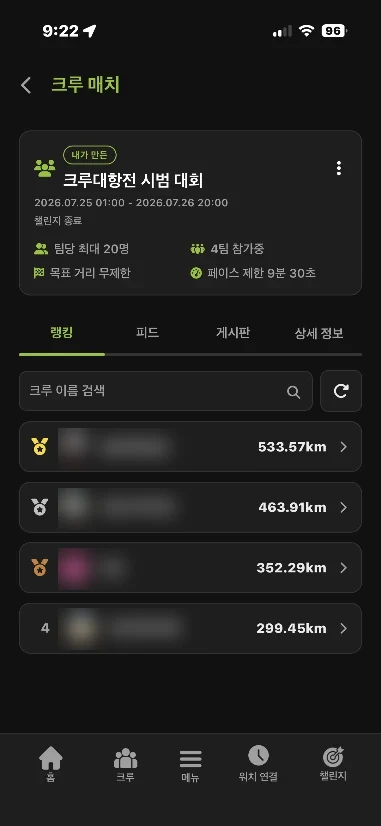
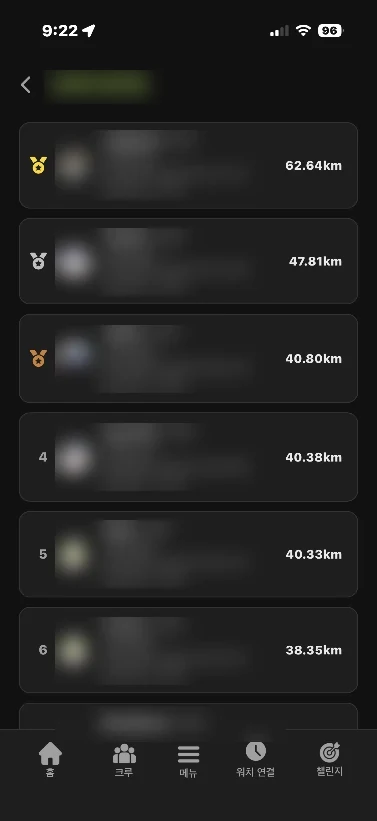
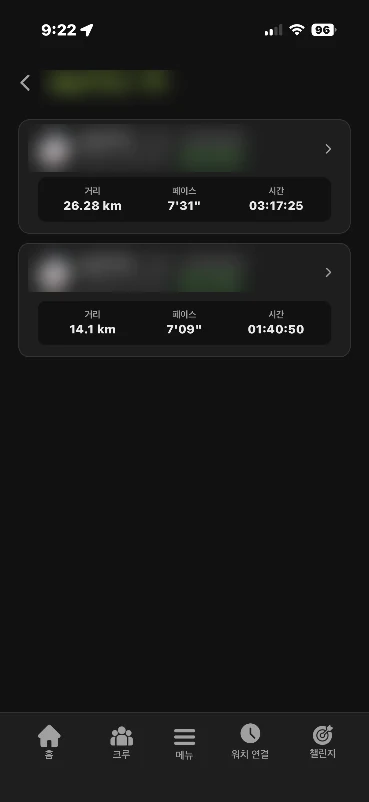
알아두면 좋아요 순위 → 크루 → 크루원 순서로 눌러 들어가면 돼요. 대회 화면 위쪽 탭에서 피드·게시판·상세 정보로 바로 넘어갈 수도 있어요.
대회에 기록 올리기
달린 기록에 사진을 붙여 올리면 대회 피드에 남아요.
- 내 러닝 기록을 열어요.
- GPS 지도 아래에서 사진을 더해요.
- 오른쪽 위 [피드 올리기] 를 눌러요.
- 올릴 곳을 골라요 — 전체 피드 · 참가 중인 대회 · 우리 크루.
알아두면 좋아요 세 곳을 함께 고르면 한 번만 올려도 세 곳에 모두 올라가요. 대회마다 따로 올릴 필요가 없어요.
게시판에서 응원하기
같은 대회에 나온 크루끼리 이야기를 나누는 곳이에요.
- 대회 화면 위쪽에서 [게시판] 을 눌러요.
- 응원이든 요청이든 자유롭게 글을 남겨요.
알아두면 좋아요 우리 크루뿐 아니라 대회에 참가한 다른 크루도 볼 수 있어요.
App Tips
Get the most out of RunnerOn's handy features.
- Record analysis — pace, heart-rate zones, cadence, and weekly/monthly stats
- Course recommendations — curated courses like riversides, city parks, and beaches, with GPX downloads
- Running conditions — check live weather, air quality, and alerts before you head out
- Marathon schedule — nationwide race dates, D-days, and a calendar
- Hall of Fame — rankings based on activity and records, plus seasonal rewards
- Exclude from battery optimization — set it up so your workout keeps recording even with the screen off (see the guide below)
How to Use Rewards
Spend the points and perks you earn from challenges and activity on partner rewards.
- Earn points and rewards from challenge completions, streaks, rankings, and more
- In My Rewards, check your coupons, physical rewards, and where to use them
- Code-based rewards are redeemed by entering the code at the partner; physical rewards come with shipping details
- Use rewards with an expiry date before they run out